
The Tax Forms page is only available on the web version of Wave.
Use the Tax Forms page to access, download, and view the filing status of your payroll tax forms. To view your tax forms, select Payroll > Tax Forms on the left-side menu.
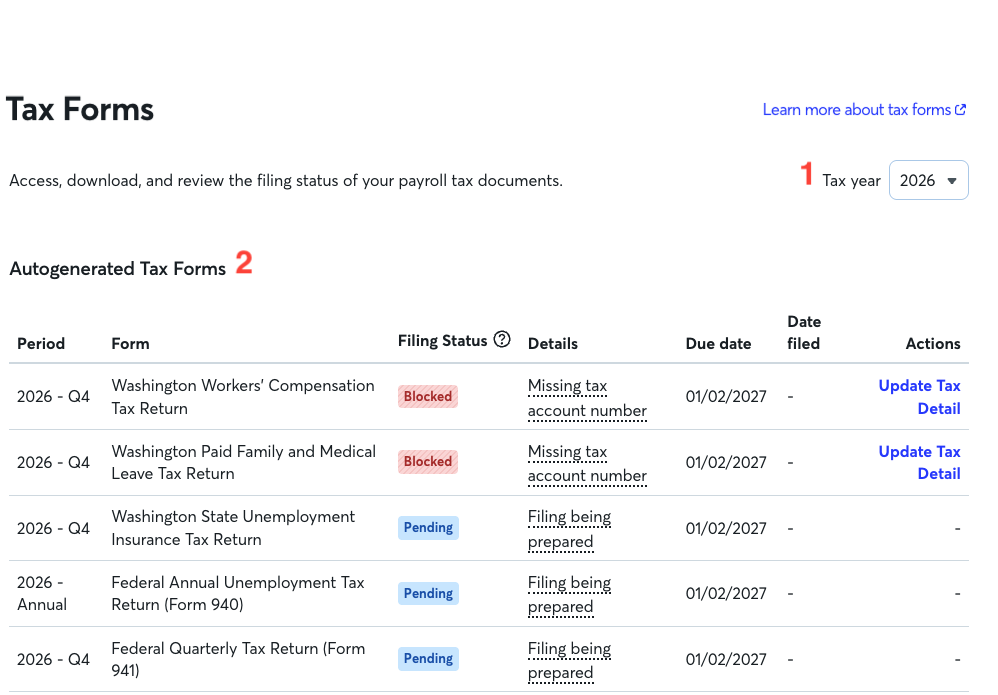

On the Tax Forms page, you will find:
- Tax year drop-down: Select the tax year from the drop-down menu at the top of the page. This allows you to view forms from the current year or previous filing periods for your employees and contractors.
-
Autogenerated Tax Forms: This section displays the following details:
- Period: The year the filing covers and the fiscal quarter, when applicable
- Form: The name of the tax form. For example, Form 941, Form PFML, or Form W-2
- Filing Status: The current processing state your form is in
- Details: More information on your filing status, including the reason your tax form filing is blocked. Hover over the details to see more
- Due date: The date the tax form is due to be filed with the government agency to meet filing requirements and avoid potential penalties
- Date filed: The date the tax form was submitted for filing with the government agency
- Actions: Click the link to resolve filing blockers, contact support, resubmit filing or download copies of your forms for your records once filing is complete
- Tax Authorization Forms: If you filed Wave Tax Service authorization forms for Q1/Q2 2025 and earlier, this section is where you can find these forms. To review, sign, or download new tax authorization forms, head to Payroll > Manage settings > Tax Authorization.
Learn how to view and understand payroll tax forms filing statuses and download payroll tax forms.
Frequently asked questions about tax forms
Why don't I see a filing for a tax form?
Wave only displays the forms required for your business. If you cannot find a form you're expecting, either Wave hasn’t generated it yet or your business doesn't need it.
What happens if a tax form is inapplicable?
Wave automatically removes a form from your list if the filing is determined to be inapplicable for your business.
Why is the Date filed column blank?
This column stays blank if the form's status is Pending or Blocked, and until your form is successfully submitted to the tax agency. The date will appear once the form moves to the next status.
How do I fix a Blocked form status?
If you see a Blocked status on a form:
- Hover over the Details column to view the reason for the blocker.
- Follow the recommended steps in the pop-up.
- Click the button in the Actions column to go to the page in Wave where you can fix the issue.
- Once resolved, return to the Tax Forms page and click Resubmit form in the Actions column.
If you have made two attempts to resubmit the filing and still need help, contact the support team. This process may take additional time. Resolving these issues quickly helps you avoid agency penalties and interest. For more information, see [US]Understand and resolve tax filing blockers
What happens after a filing blocker is resolved?
Once the blocker is resolved, the form's status changes to Pending within 24 hours. The form is then automatically ready for refiling.