
The Chart of Accounts page is only available on the web version of Wave.
A chart of accounts is a record of your financial accounts. When you categorize a transaction, it’s categorized to an account within the chart of accounts. Wave uses this information to help generate your reports.
To access your chart of accounts, on the left-side menu, click Accounting > Chart of Accounts.
Learn how to understand and use your chart of accounts with a video.
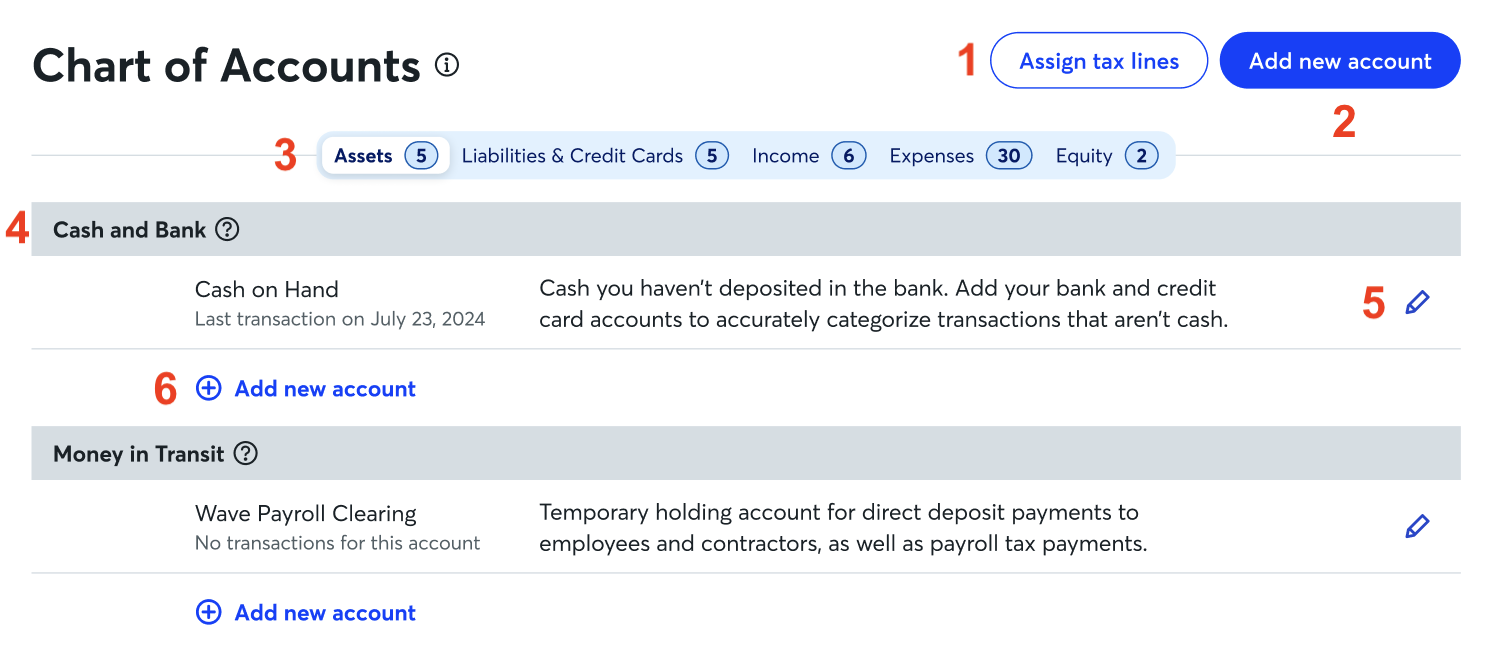
On your Chart of Accounts page, you can:
-
Access tax line mapping: Open the tax line mapping page and view or assign tax lines to your income and expense accounts.
Tax line mapping is being slowly rolled out over the next few weeks.
- Add a new account: Your chart of accounts has common accounts related to the business type you selected during setup. To create your own accounts, at the top right corner, click Add a New Account. Then, begin at step three in Add an account to your chart of accounts.
-
Tab overview: Click through the tabs to see your accounts under each account type.
- The Asset tab contains the accounts that record valuables your business owns.
- The Liabilities & Credit Cards tab contains credit cards and accounts where money is owed to a third party.
- The Income tab contains accounts that record revenue generated for your business.
- The Expense tab contains accounts that record expenses for your business.
- The Equity tab contains accounts for owner contributions and drawings, and profits.
- View accounts: The grey headings represent account types. Within each account type, you can find all your added accounts and the accounts created by Wave.
- Edit accounts: To edit the account details or archive the account, click the pencil icon to the far right of the account name.
- Add a new account under a specific account type: To add a new account under a specific account type, click Add a new account under that account type. Enter any details, then click Save.
Your chart of accounts is set up with standard tabs and account types. Custom tabs, new account types, and subaccounts are not currently supported.