
You can cancel a payment if it is still processing and has not yet been accepted. In the Timeline section of the Payment details, the status will show Payment processing.
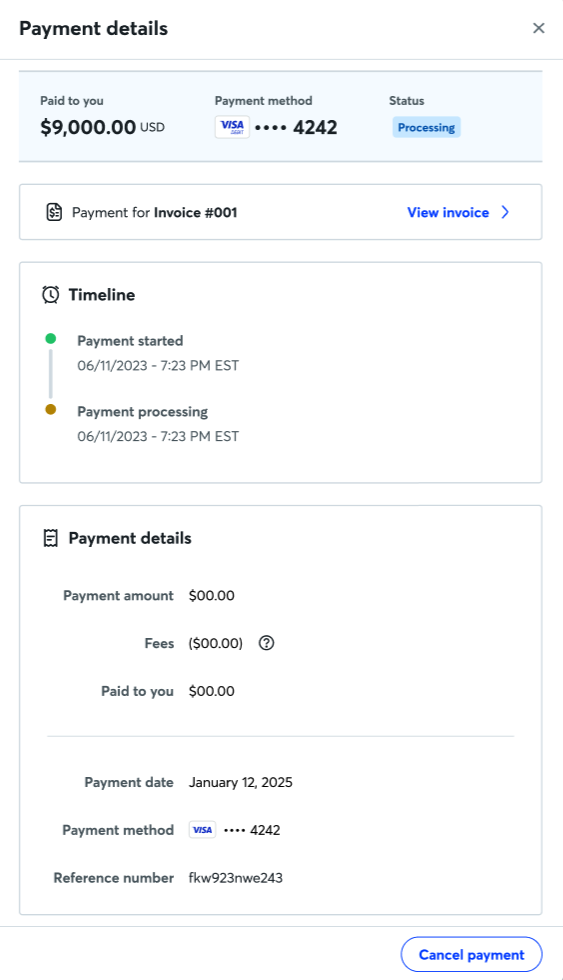
To cancel a payment:
- Log in at waveapps.com.
- On the left-side menu, click Sales & Payments > Payments.
- Click on the payment you want to cancel.
- Click Cancel payment in the pop-up.
- To confirm, click Yes, cancel payment.
If successful, the status of the payment will change to Cancellation processing. Processing usually takes a few minutes. Once processed, the status will update to Cancelled.
If the cancellation doesn't process, you'll see the status Cancellation failed. If this happens, follow the steps above to try again as soon as possible, otherwise, your payment will continue processing.
Once the payment is processed, you cannot cancel it. If this happens, you can refund the payment instead.