
The first time you approve an invoice with a discount, Wave creates an account called Sales Discounts. This account is under the Income tab in your Chart of Accounts.
Once an invoice is approved, the discounted amount is recorded under Sales Discounts.
Discounts appear as negative amounts on your Profit & Loss Report because they reduce your income.
Each invoice can have only one discount.
Add a discount to an invoice in your web browser
Add a discount to an invoice in the Wave mobile app
Add a discount to an invoice in your web browser
- On the left-side menu, click Sales & Payments > Invoices.
- Select the invoice, then click Edit Invoice.
-
Below the subtotal, click Add a discount. A line labelled Discount will appear.
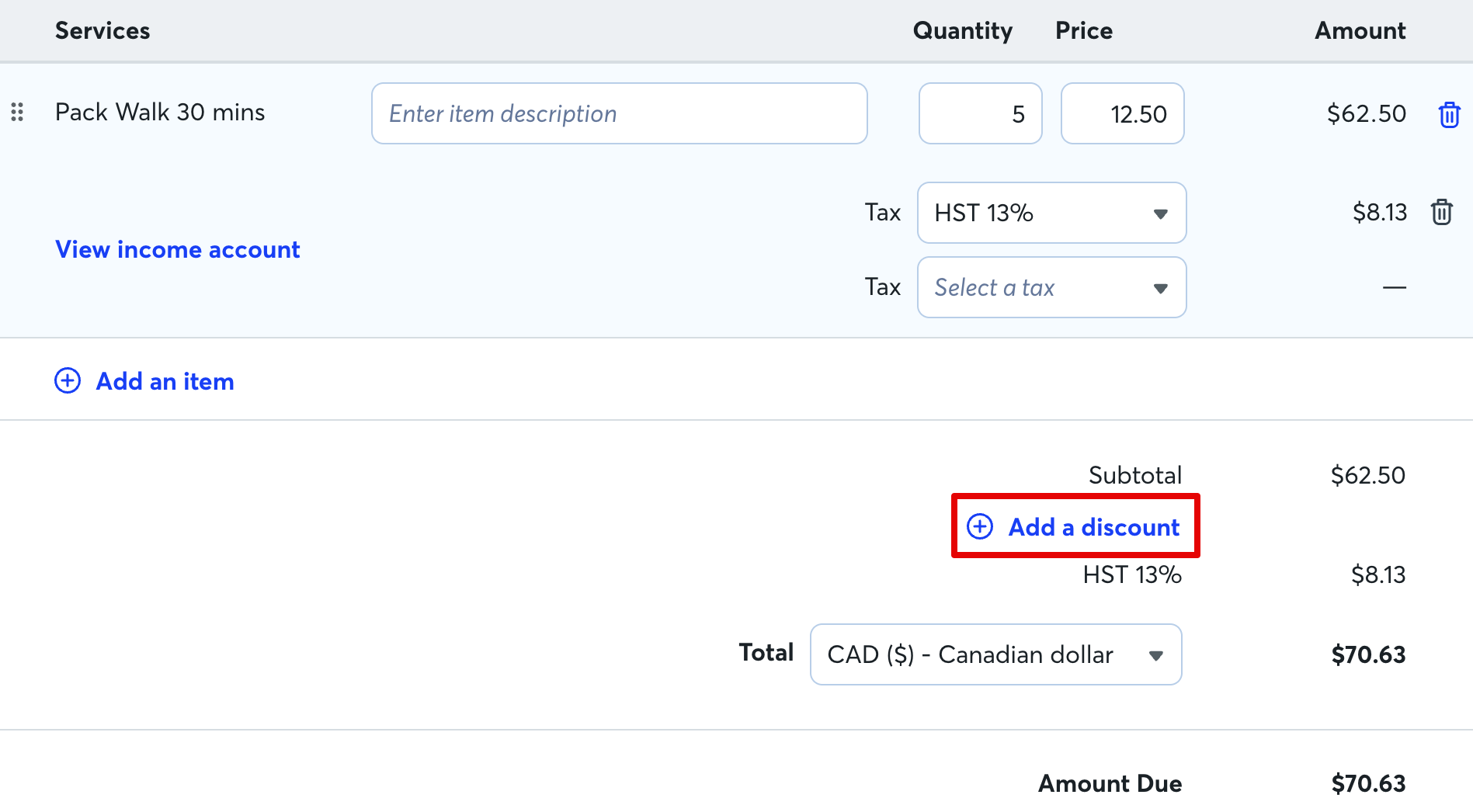
- From the dropdown menu, select $ to discount a dollar amount or % to discount a percentage of the subtotal.
- Enter the dollar amount or percentage to discount.
Discounts reduce the invoice total before tax is calculated.
Add a discount to an invoice in the mobile app
- On the bottom menu, tap Sales > Invoices.
- Tap the invoice, then tap the pencil icon.
- Scroll down to the Amount due section, and tap Add discount.
- Select to discount a fixed amount or a percentage of the subtotal.
- Enter the dollar amount or percentage to discount.
- Tap Done.
Discounts reduce the invoice total before tax is calculated.